lunes, 13 de abril de 2020

DOWNLOAD BLACKMART ANDROID APP – DOWNLOAD PLAYSTORE PAID APPS FREE

Android made endless possibilities for everyone. It introduced a platform where are millions of apps that a user can download and buy depending on their needs. You're thinking about Google PlayStore, yes I am also talking about Google PlayStore. It's categorized app collection depending on every niche of life. Few of them are free and some of them are paid. Most of the paid apps are only charges small cost in between $2 to $8, but few apps are highly costly that make cost over $50 even, which is not possible for every user to buy and get benefit from it. So, here I am sharing a really useful app, that can make every Google PlayStore app for you to download it for free. You can download any paid app that may even cost about $50. It's totally free. Download blackmart Android app and download google play store paid apps freely.

DOWNLOAD BLACKMART ANDROID APP – DOWNLOAD PLAYSTORE PAID APPS FREE

  • It's extremely easy to use.
  • It has a Multilingual option for a global user experience.
  • The app doesn't ask for any payments.
  • Capable to download full of downloadable applications.
  • Super fast in downloading and installation.
Continue reading
  1. Hack Tools Download
  2. Hacking Tools For Kali Linux
  3. New Hack Tools
  4. Hacker Tool Kit
  5. Pentest Tools Website
  6. Hacker Search Tools
  7. Pentest Tools For Ubuntu
  8. Pentest Tools Alternative
  9. Hacker Tools For Mac
  10. Hacker Tools For Mac
  11. Pentest Tools Url Fuzzer
  12. Hackers Toolbox
  13. How To Install Pentest Tools In Ubuntu
  14. Hacker Tools
  15. Hacker Tools Free Download
  16. Pentest Tools Bluekeep
  17. Pentest Tools For Ubuntu
  18. What Is Hacking Tools
  19. Underground Hacker Sites
  20. Hacking Tools
  21. Hacking Apps

Top Process Related Commands In Linux Distributions


Commands in Linux are just the keys to explore and close the Linux. As you can do things manually by simple clicking over the programs just like windows to open an applications. But if you don't have any idea about commands of Linux and definitely you also don't know about the Linux terminal. You cannot explore Linux deeply. Because terminal is the brain of the Linux and you can do everything by using Linux terminal in any Linux distribution. So, if you wanna work over the Linux distro then you should know about the commands as well. In this blog you will exactly get the content about Linux processes commands which are are given below.

ps

The "ps" command is used in Linux to display your currently active processes over the Linux based system. It will give you all the detail of the processes which are active on the system.

ps aux|grep

The "ps aux|grep" command is used in Linux distributions to find all the process id of particular process like if you wanna know about all the process ids related to telnet process then you just have to type a simple command like "ps aux|grep 'telnet'". This command will give you the details about telnet processes.

pmap

The "pmap" command in Linux operating system will display the map of processes running over the memory in Linux based system.

top

The "top" command is used in Linux operating system to display all the running processes over the system's background. It will display all the processes with process id (pid) by which you can easily kill/end the process.

Kill pid

Basically the kill command is used to kill or end the process or processes by simply giving the process id to the kill command and it will end the process or processes. Just type kill and gave the particular process id or different process ids by putting the space in between all of them. kill 456 567 5673 etc.

killall proc

The "killall proc" is the command used in Linux operating system to kill all the processes named proc in the system. Killall command just require a parameter as name which is common in some of the processes in the system.

bg

The "bg" is the command used in Linux distributions to resume suspended jobs without bringing them to foreground.

fg

The "fg" command is used in Linux operating system to brings the most recent job to foreground. The fg command also requires parameters to do some actions like "fg n" n is as a parameter to fg command that brings job n to the foreground.Related posts
  1. Hacker Security Tools
  2. Hacker Tools 2019
  3. Pentest Tools Framework
  4. Easy Hack Tools
  5. Computer Hacker
  6. Pentest Tools Free
  7. Hack Tools Online
  8. Pentest Tools Windows
  9. Pentest Tools Linux
  10. Hacking Tools Kit
  11. Hacker Tools For Mac
  12. Hack Tools Pc
  13. Hacker Tools Windows
  14. Hacking Tools For Mac
  15. Best Pentesting Tools 2018
  16. Hacker Tools Software
  17. Pentest Tools Port Scanner
  18. Hacker Tools 2019
  19. Hacker Tools Free
  20. Hack Tools Github
  21. Underground Hacker Sites
  22. Hacker Tools Windows
  23. Hacker Tools For Windows
  24. Pentest Tools Bluekeep

BEST PASSWORD MANAGERS FOR IOS

As I said, Apple's iOS is also prone to cyber attacks, so you can use some of the best password managers for iOS to secure your online accounts.

BEST PASSWORD MANAGERS FOR IOS

Here I have streamlined few of the best password managers for iOS including Keeper, OneSafe, Enpass, mSecure, LastPass, RoboForm, SplashID Safe and LoginBox Pro.

1. ONESAFE PASSWORD MANAGER (CROSS-PLATFORM)

OneSafe is one of the best Password Manager apps for iOS devices that lets you store not only your accounts' passwords but also sensitive documents, credit card details, photos, and more.
OneSafe password manager app for iOS encrypts your data behind a master password, with AES-256 encryption — the highest level available on mobile — and Touch ID. There is also an option for additional passwords for given folders.
OneSafe password manager for iOS also offers an in-app browser that supports autofill of logins, so that you don't need to enter your login details every time.
Besides this, OneSafe also provides advanced security for your accounts' passwords with features like auto-lock, intrusion detection, self-destruct mode, decoy safe and double protection.
Download OneSafe Password Manager: iOS | Mac | Android | Windows

2. SPLASHID SAFE PASSWORD MANAGER (CROSS-PLATFORM)

SplashID Safe is one of the oldest and best password management tools for iOS that allows users to securely store their login data and other sensitive information in an encrypted record.
All your information, including website logins, credit card and social security data, photos and file attachments, are protected with 256-bit encryption.
SplashID Safe Password Manager app for iOS also provides web autofill option, meaning you will not have to bother copy-pasting your passwords in login.
The free version of SplashID Safe app comes with basic record storage functionality, though you can opt for premium subscriptions that provide cross-device syncing among other premium features.
Download SplashID Safe Password Manager: Windows and Mac | iOS | Android

3. LOGIN BOX PRO PASSWORD MANAGER

LoginBox Pro is another great password manager app for iOS devices. The app provides a single tap login to any website you visit, making the password manager app as the safest and fastest way to sign in to password-protected internet sites.
LoginBox Password Manager app for iOS combines a password manager as well as a browser.
From the moment you download it, all your login actions, including entering information, tapping buttons, checking boxes, or answering security questions, automatically completes by the login box Password Manager app.
For security, the login box Password Manager app uses hardware-accelerated AES encryption and passcode to encrypt your data and save it on your device itself.
Download LoginBox Password Manager: iOS | Android

Related word


  1. Hack Tools Download
  2. Black Hat Hacker Tools
  3. Hackers Toolbox
  4. Hack Tools For Windows
  5. Hacking Tools Windows
  6. Hacking Apps
  7. Pentest Tools Alternative
  8. Hack Tools For Mac
  9. Hack And Tools
  10. Beginner Hacker Tools
  11. Pentest Tools For Ubuntu
  12. Hacker Tools Linux
  13. Tools 4 Hack
  14. Pentest Tools Kali Linux
  15. Growth Hacker Tools
  16. Hacking Tools 2019
  17. Pentest Tools Subdomain
  18. Hacker Tools
  19. Pentest Tools For Ubuntu

Google And Apple Plan To Turn Phones Into COVID-19 Contact-Tracking Devices

Tech giants Apple and Google have joined forces to develop an interoperable contract-tracing tool that will help individuals determine if they have come in contact with someone infected with COVID-19. As part of this new initiative, the companies are expected to release an API that public agencies can integrate into their apps. The next iteration will be a built-in system-level platform that

via The Hacker News

Read more


  1. Pentest Tools Kali Linux
  2. Bluetooth Hacking Tools Kali
  3. Hack Apps
  4. Hacking Tools Pc
  5. Hacking Tools For Mac
  6. Pentest Tools Website
  7. Hacking Tools Windows
  8. Hacker Tools Online
  9. Pentest Tools Windows
  10. Kik Hack Tools
  11. Hack Rom Tools
  12. Hacking Tools Name
  13. Hacking Tools Name
  14. Hacking Tools For Games
  15. Hack Tools For Games

sábado, 11 de abril de 2020

Thinking Fast And Slow: Book Review (Monday Musings 84)

I heard about this book from one of my streamer friends after I mentioned how I don't think of myself as good at responding to unexpected things. I rarely think on my feet as well as I'd like. She'd heard about Thinking Fast and Slow by Daniel Kahneman and felt it might explain why some people can't respond quickly to surprises. Further, those types of people are more thoughtful, so I might not feel too bad about myself.

However, the book goes into different matters than what I hoped. Kahneman's thesis is that humans are not rational and how that was a huge breakthrough in the world of economics. This surprised me, because we all know that people do really stupid things, even the most rational among us...for example, we all know usually sensible people who don't wear helmets or seatbelts nor take other easy to implement safety precautionss.

Even so, the predominant tendency in economics for most of its existence as a science is to hold that people are rational and will do rational things. Kahneman proposes otherwise. He describes two systems that we use: System 1 is the immediate reaction we have to stimulus, our gut instinct. If we see an animal, we know right away that it's a dog, we don't have to think about it. Or, if we see smoke, we're know to try to put the fire out...or to flee.

While System 2 is your conscious mind, where you think things through. For instance, making a decision to buy one product rather than another. In a series of experiments, Kahneman shows that System 2 isn't always rational and thoughtful, but can be rather lazy. This can be very true, because we have to deal with a lot of issues in life, so that we can't spend that much energy carefully thinking through every decision and thought process. That would be too exhausting.

One experiment proving his thesis is the following problem: A ball and a bat costs $1.10, and the bat costs $1.00, how much does the ball cost?

I would immediately say "definitely not 10 cents" but only because I'm aware of these psychological experiments where the answer is often not what you think at first.

Even so, if I were a participant in this study, I would've answered, "Definitely not 10 cents, but I'm too tired to figure out the true cost of the ball". Most people answer 10 cents, because that's your impulse from System 1, and System 2 is too lazy to override the impulse.

As you can see from this example, your system 1 comes up immediately 10 cents, but your system 2 doesn't override this answer. The correct answer is 5 cents.

Kahneman also describes how system 2 is very biased - in one of many experiments he conducted, he showed how sentences in big bold letters are believed to be true more so than the same sentences in small lettering.

I found the first few chapters very interesting, and the experiments thought provoking. However, midway through the book, I couldn't get past the rest of the book because Kahneman gives so many thought experiments, it becomes tiring.

Indeed, the book appeared to be a monograph, where he would make a statement and then show examples to prove his theory. By answering all of the questions that he asks, I got fatigued.

As a result, I skipped the rest of the book to the conclusion. Because humans don't do things that are good for us, policies should allow for freedom of choice, but steer people toward the right thing to do.

For instance, employees are automatically opted in an IRA retirement savings plan at 10% of their salary. However, you can easily opt out of this plan if you want to.

Therefore, you have a choice to opt in or opt out. But with this policy, people may be too "lazy" to opt out, and unbeknownst to them, 10% goes into retirement fund. 10 years later, they will be surprised that it increased to a really nice sum.

Kahneman didn't mention this in his conclusion, but the conclusion I got from the book is to be open minded. We may think something is absolutely true, come to find out, we didn't realize that we were wrong all along, and never questioned it. By being open minded and nonjudgmental, your life will be more enriching. 

For instance, someone whom you had negative first impressions (System 1 making snap judgments), keep an open mind about that person, and you may find the person becoming your friend. Of course, if that person does awful things one after the other, then your first impressions were correct and System 2 will note to avoid that person. But this will be due to empirical evidence as opposed to a snap judgment.

It's easy to say people do dumb things all the time, but how do you explain why that's the case, and how do you prove it in a systematic way? In Thinking Fast and Slow, Kahneman does a superb job answering those questions, albeit in an eventually exhausting to read manner.

The How of Happiness Review

miércoles, 8 de abril de 2020

Swiss Pike Complete

It is with considerable pleasure that I've finished the Swiss pike. I started this project a couple of days before Christmas so am very pleased to have them done by now. They have worked out exactly how I wanted, 6 chunky dynamic units that weren't just blokes standing about with upright pikes


The 6 blocks together.

Still got a way to go with mounted crossbows, more handgunners and foot crossbows still to to do, plus maybe some German ally knights

Up close to the charge
left to right: Schwyz/Basel, Glarus/Solothurn, Uri, Berne, Lucerne/Zurich, Basel-Stadt/Appenzell

Uri Handgunners to the fore


sábado, 28 de marzo de 2020

Convergence Hobby Update - Speed Painting CoC


One of the theories I had about owning a Convergence of Cyriss army is that it would be very easy to paint quickly.

I am not a particularly skilled painter, though I truly enjoy it when I have a fully painted list on the table. I paint to a standard that I can look at the model from 3 feet away and be happy with it. Not what the crazy painter friends I have are happy with, but what I'm happy with being on the table. This is important as a standard because painting is about time and I don't particularly have a lot of it.

A large part of my enjoyment comes from the idea that once I have a faction fully painted, I can just put it on the table and play and not have to think "damn I need to get to painting this."

So the theory about painting CoC is that you can prime the models with a metallic spray paint, add in a few colors, apply a wash, and then be done.  Turns out this is actually true!


Since my last post about CoC spoke about how the bulk of the models I received were in really bad shape and I highlighted obnoxious the paint jobs were in addition to the fact that most everything was in pieces when it arrived, compare this to what the Monitor looked like before it was primed and painted:


That's quite a transformation! So how much effort was put into this from a painting perspective?


  • I based the model with sand/aquarium gravel.
  • I spray painted the model with some metallic spray paint, though I did test on the extra armless Axis model that was sent with my lot to make sure the primer wasn't going to be too thick. 
  • I spent roughly 2 hours or so applying the colors and washes to the primed model.
  • I also had to repaint the base and basing material black instead of silver, which was odd but worth it for how much time the whole process saved me.
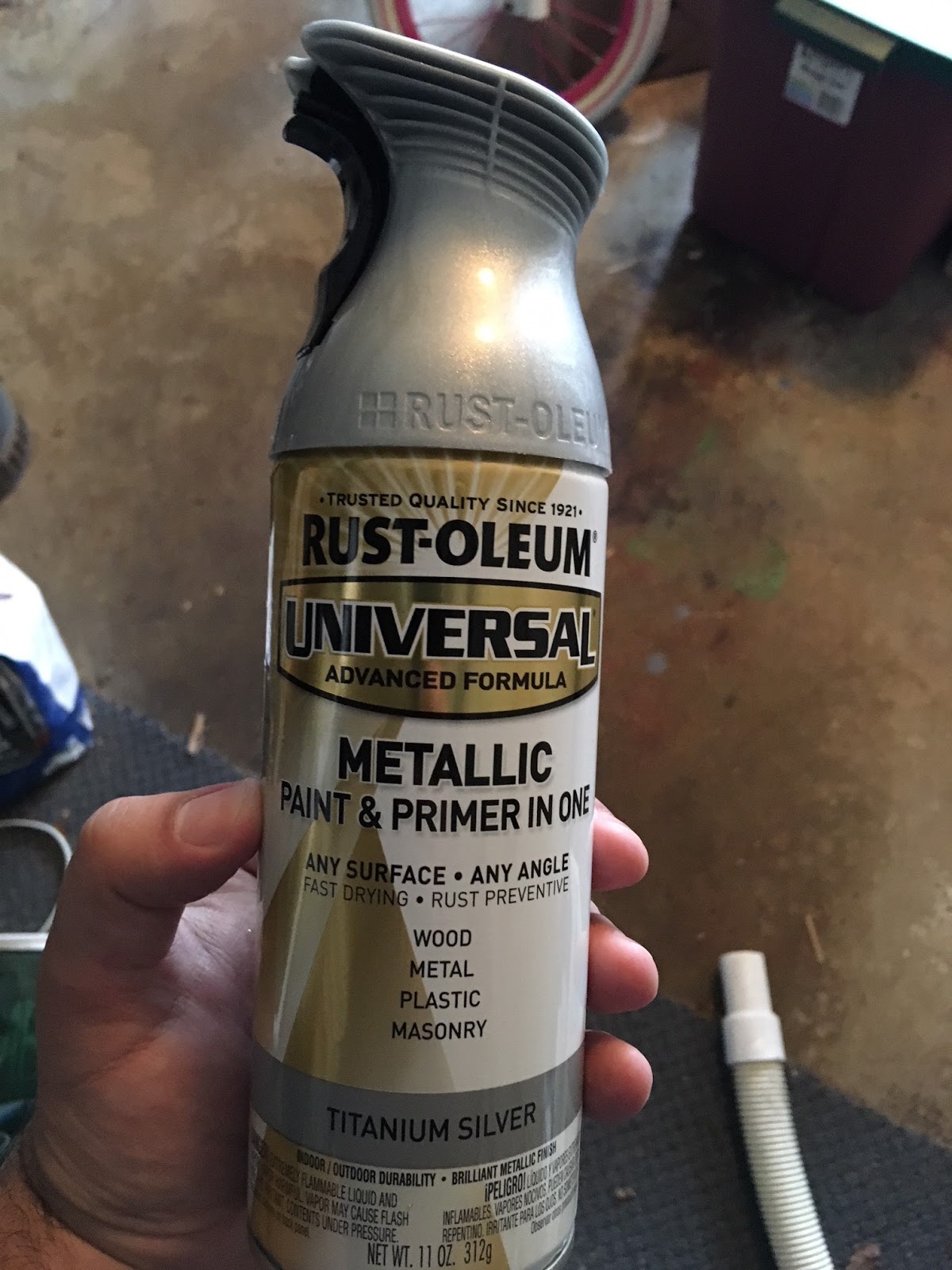
I didn't get any fancy primer either, just some Rust-olium at Home Depot:


I should put a few notes, since it was slightly jarring with this as a primer.

The model will look almost comically silver when primed. In fact it was left slightly sticky, despite drying for nearly 24 hours after being primed. In fact before I started I was afraid the entire project was going to be a failure and I'd have to just prime everything black like I always do.

Luckily the washes came through for me in the end.  It's amazing what that did when combined with some gold and bronze paint on the model.  Everything turned out about as I'd have expected it in the end, and I'm at a point where I think I can really hammer out my CoC army probably well ahead of my Trolls.

As a point of painting comparison, I spent about two hours painting that Monitor. I spent about an hour and a half just touching up the base painting on my first Longrider unit, and I still have to finish painting the metals on it before I can apply my wash and then go back and hit a highlight to get the skin on the trolls the way I want it.

Perhaps it's because I'm pushing the Trolls to be painted to a much higher standard than what I think the CoC should be, but man does it just feel nice to be able to knock out a model and have it come out looking good enough for me to be happy with. For my Trolls I feel like I need to put in all this extra work to get it to a point where I'm happy. I suppose that's the difference between having models of something organic like a beast or a infantry with lots of exposed flesh vs. robots. Here's an example of what I paint my Trolls to:


Right now I have to admit it's almost tempting to just try and get the CoC going. I did get lucky and have my wife agree to let me play in our local Scrum League (think a Steamroller with 1 game a week), and lists are due Friday. I was very likely playing Trolls in it, though after last night I admit that I've had some thoughts about playing CoC instead. I have two days to decide!